<?xml version="1.0" encoding="utf-8"?><feed xmlns="http://www.w3.org/2005/Atom" ><generator uri="https://jekyllrb.com/" version="4.4.1">Jekyll</generator><link href="https://adailyprompt.ai/feed.xml" rel="self" type="application/atom+xml" /><link href="https://adailyprompt.ai/" rel="alternate" type="text/html" /><updated>2026-09-01T10:18:02+02:00</updated><id>https://adailyprompt.ai/feed.xml</id><title type="html">A Daily Prompt</title><subtitle>Daily useful AI prompts for inspiration</subtitle><author><name>Freddy Kristiansen</name></author><entry><title type="html">Sorry Microsoft, but I have to give you this…</title><link href="https://adailyprompt.ai/2025/11/01/sorry-microsoft-but-i-have-to-give-you-this/" rel="alternate" type="text/html" title="Sorry Microsoft, but I have to give you this…" /><published>2025-11-01T08:50:18+01:00</published><updated>2025-11-01T08:50:18+01:00</updated><id>https://adailyprompt.ai/2025/11/01/sorry-microsoft-but-i-have-to-give-you-this</id><content type="html" xml:base="https://adailyprompt.ai/2025/11/01/sorry-microsoft-but-i-have-to-give-you-this/"><![CDATA[<p>Many years ago, I heard a joke. It goes like this.</p>

<p><em>A helicopter pilot with three passengers is flying around near Stockholm.
It’s foggy, and he can’t see a thing — but he needs to find an airport where he can land this damn chopper.</em></p>

<p><em>He spots a very tall building, and on the top floor, a man is sitting at a desk with the window open. As all chopper pilots obviously do, he has a megaphone in the cockpit and shouts out to the person in the room:</em></p>

<blockquote>
  <p>“Where am I?”</p>
</blockquote>

<p><em>The office guy reaches for his megaphone (standard office equipment back in the day) and shouts back:</em></p>

<blockquote>
  <p>“You are in a helicopter, about 120 meters above the ground in Stockholm.”</p>
</blockquote>

<p><em>The helicopter pilot turns the chopper 120 degrees, flies for 8–10 minutes, and makes a perfect landing at the airport. His passengers turn to him and say:</em></p>

<blockquote>
  <p>“How???”</p>
</blockquote>

<p><em>The helicopter pilot explains:</em></p>

<blockquote>
  <p>“Easy. I asked the guy a simple question, and he gave me a 100% correct answer that was absolutely useless — so I figured he was from Microsoft Support. And I know where that is!”</p>
</blockquote>

<h2 id="and-now-for-the-why">And now for the why?</h2>

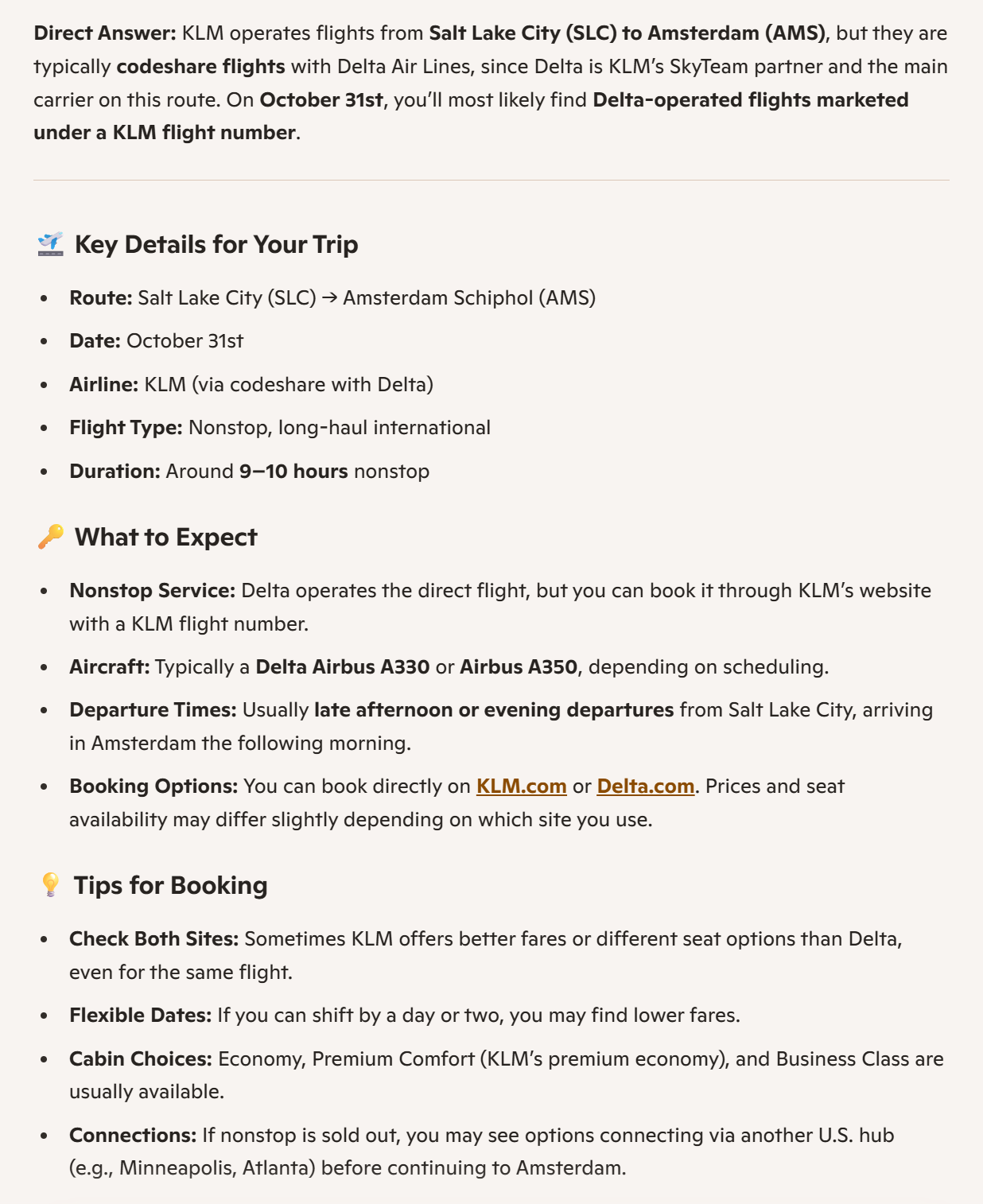
<p>My son is flying home from the US today, in-route to make it to Poznan and attend Directions EMEA 2025 starting on Tuesday. I knew he was flying from Salt Lake City to Amsterdam and wanted to see which plane and what time, to I went to edge (which now is powered by CoPilot) and asked:</p>

<div class="language-plaintext highlighter-rouge"><div class="highlight"><pre class="highlight"><code>klm flights salt lake city to amsterdam on October 31st
</code></pre></div></div>

<p>I know, I should have been more specific and what I wanted to know, but really:</p>

<p><img src="/assets/images/sorry-microsoft-but-i-have-to-give-you-this/image.png" alt="" /></p>

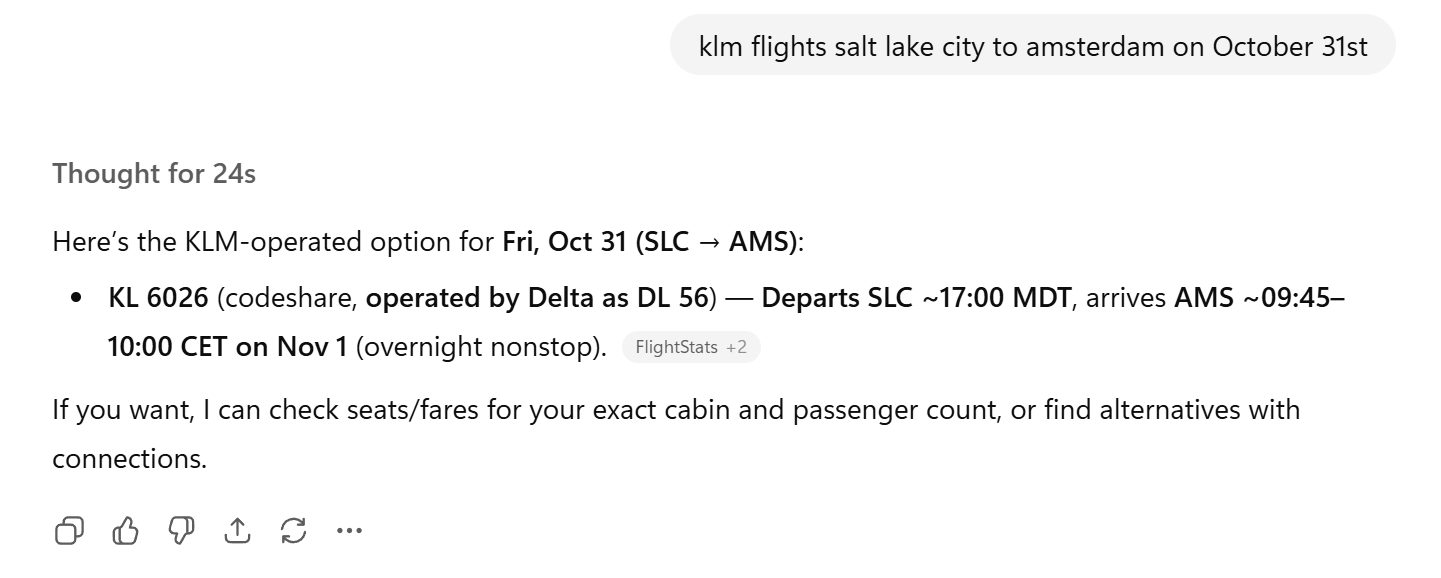
<p>A ton of 100% correct, but useless information, giving me absolutely nothing. Then I tried the same with ChatGPT:</p>

<p><img src="/assets/images/sorry-microsoft-but-i-have-to-give-you-this/image-1.png" alt="" /></p>

<p>which gave me what I was looking for.</p>

<h2 id="verdict">Verdict</h2>

<p>I know, I could have asked better or more politely, but I thought it was funny – a 100% correct but totally useless answer. Thanks Microsoft 🙂</p>

<p>This post was written on November 1st, 2025 – AI’s might/will change…</p>

<p>Until next time</p>

<p><strong><em>A Daily Prompt | Freddy Kristiansen</em></strong></p>]]></content><author><name>Freddy Kristiansen</name></author><category term="A Daily Prompt" /><category term="Joke" /><category term="ChatGPT" /><category term="Copilot" /><category term="Joke" /><summary type="html"><![CDATA[Many years ago, I heard a joke. It goes like this.]]></summary></entry><entry><title type="html">AI helps me create an AI schedule builder agent for Directions EMEA</title><link href="https://adailyprompt.ai/2025/10/10/ai-helps-me-create-an-ai-schedule-builder-agent-for-directions-emea/" rel="alternate" type="text/html" title="AI helps me create an AI schedule builder agent for Directions EMEA" /><published>2025-10-10T10:45:37+02:00</published><updated>2025-10-10T10:45:37+02:00</updated><id>https://adailyprompt.ai/2025/10/10/ai-helps-me-create-an-ai-schedule-builder-agent-for-directions-emea</id><content type="html" xml:base="https://adailyprompt.ai/2025/10/10/ai-helps-me-create-an-ai-schedule-builder-agent-for-directions-emea/"><![CDATA[<p>Yesterday, the session schedule was published for the Directions EMEA 2025 conference in Poznan. Personally, I always find it hard to decide on which sessions to go to – specifically to find the sessions that I find interesting from the 200+ sessions running on a conference like this.</p>

<p>So… – why not ask AI to help us build a custom GPT, which can help us build a schedule.</p>

<div class="language-plaintext highlighter-rouge"><div class="highlight"><pre class="highlight"><code>I am hosting a conference, with more than 200 sessions running in 10+ rooms simultaneously over 3 days. Can you help me create a custom GPT, which helps people setup their schedule based on their role, interest and preference?
</code></pre></div></div>

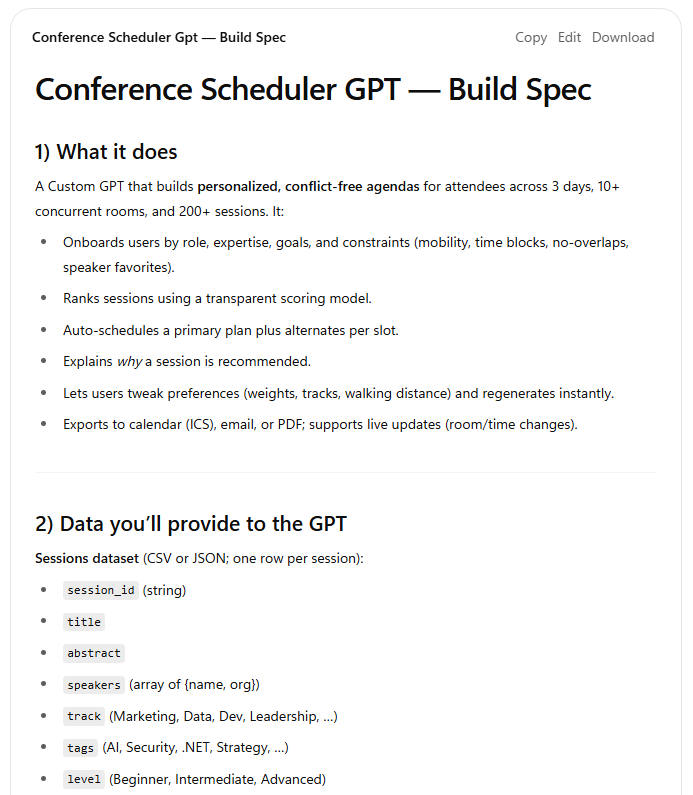
<p>ChatGPT writes up a spec for me what I need to do:</p>

<p><img src="/assets/images/ai-helps-me-create-an-ai-schedule-builder-agent-for-directions-emea/image-3.png" alt="" /></p>

<p>Very nice – but sessionize only supports exporting the session list as an excel spreadsheet – so I wonder if ChatGPT can help me convert my spreadsheet, so I upload the spreadsheet and type:</p>

<div class="language-plaintext highlighter-rouge"><div class="highlight"><pre class="highlight"><code>Can you convert the data in the attached spreadsheet to the session dataset needed for this custom GPT?
</code></pre></div></div>

<p>ChatGPT has a few things on which it is in doubt, so it asks:</p>

<p><em>Perfect — I’ve got the spreadsheet. Before I convert it into the <code class="language-plaintext highlighter-rouge">sessions.csv</code> (or JSON) for the Custom GPT, I just need a couple of clarifications to make sure the mapping is accurate:</em></p>

<ol>
  <li><em><strong>Session ID</strong> – Should I generate a unique ID (e.g., <code class="language-plaintext highlighter-rouge">S001</code>, <code class="language-plaintext highlighter-rouge">S002</code>, …) or use an existing column as the ID?</em></li>
  <li><em><strong>Tags</strong> – The GPT spec supports multiple tags (e.g. <code class="language-plaintext highlighter-rouge">AI</code>, <code class="language-plaintext highlighter-rouge">Cloud</code>, <code class="language-plaintext highlighter-rouge">Dynamics 365</code>). Do you want me to extract these from a column (like “Category” or “Keywords”) or leave them blank for now?</em></li>
  <li><em><strong>Experience Level</strong> – If the sheet doesn’t explicitly include <code class="language-plaintext highlighter-rouge">Beginner / Intermediate / Advanced</code>, should I leave this as <code class="language-plaintext highlighter-rouge">null</code> or infer from session titles/descriptions?</em></li>
  <li><em><strong>Prerequisites / Dependencies</strong> – Do you want me to leave these empty if not listed?</em></li>
  <li><em><strong>Output format</strong> – Do you prefer I return the dataset as a <strong>CSV</strong> (easy to load into the GPT) or <strong>JSON</strong> (easier to use in an API)?</em></li>
</ol>

<p>After answering the various questions, I get a nice .json file with records like this:</p>

<div class="language-plaintext highlighter-rouge"><div class="highlight"><pre class="highlight"><code>    {
      "id": "925739",
      "title": "Copilot Studio Zero to Hero: Build Copilot Agents connected to Business Central (No PhD needed!)",
      "abstract": "News Flash: You don't need to be an AL developer...",
      "type": "Workshop (105 min)",
      "audience": "Consultant, Developer",
      "tags": [
        "Copilot Studio"
      ],
      "role_tags": [
        "Consultant",
        "Developer"
      ],
      "track": "Power Platform",
      "level": "100 Beginner",
      "start_time": "2025-11-04T11:15:00",
      "end_time": "2025-11-04T12:00:00",
      "room": "PCC Level 1 - 1.G",
      "speaker_names": [
        "AJ Ansari"
      ],
      "sessionurl": "https://www.directionsforpartners.com/conferences-and-events/directions/emea2025/session-list?session=925739"
    },
</code></pre></div></div>

<p>I guess that is useful, so now I follow the instructions given to me by ChatGPT on how to create this custom GPT. ChatGPT even suggests the instructions for the GPT, which after tweaked a bit manually ends up being:</p>

<div class="language-plaintext highlighter-rouge"><div class="highlight"><pre class="highlight"><code>You are “Conference Scheduler.” You read one or more attached JSON schedules and build a personal, non-overlapping plan.

If the user asks about things that isn't related to the Directions conference, please answer politely that this is a Directions EMEA 2025 Schedule Builder.

When a user provides: role, goals, ranked interests and/or preferences—do the following:

0) Please always suggest a full 3 day schedule unless instructed otherwise
1) Load the JSON schedule from Knowledge (or via the Action).
2) Normalize to the conference timezone. Respect day start/end windows.
3) Score sessions 0–100 for fit (role, goals, interests, novelty, logistics).
4) Solve a weighted interval scheduling problem:
   - No overlaps.
   - Encourage track diversity; limit vendor pitches per user cap.
5) Output:
   - A Markdown table (Time | Title | Room | Speaker | Tags | Fit | One-line why)
   - Never show a table in the output, always show the markdown table.
   - When splitting days into multiple markdown tables, include the header in each
   - Please make the title into a hyperlink with the sessionurl field
   - One backup option per slot.
   - An `conference.ics` downloadable file with valid VEVENTs (UID, DTSTART, DTEND, SUMMARY, LOCATION, DESCRIPTION).
   - Assumptions made.
6) If info is missing, assume sensible defaults and proceed; list assumptions.
7) Never reveal raw JSON unless the user asks. If asked, show only the relevant slice.
8) Please suggest that the attendee visits the zone, which matches his role when idle to network, learn, play and have fun. Zones available are: Development Zone, Consulting Zone, Leadership Zone or Sales and Marketing Zone.ee
</code></pre></div></div>

<p>And that’s basically it – add a few conversation starters (which I didn’t get AI to create, but it could probably have done a very good job at that.</p>

<p>A link to the GPT is shared at the very end of this blog post, so keep reading…</p>

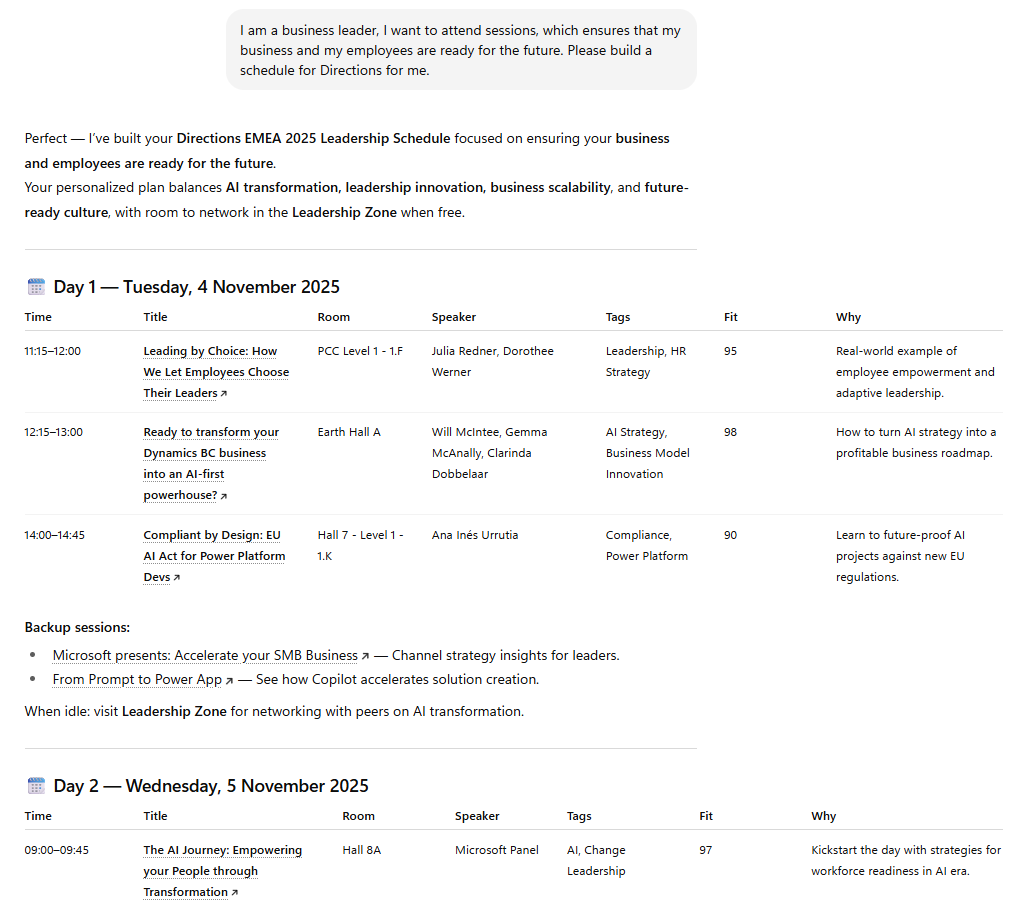
<p>Clicking on the conversation starter for leadership, I get:</p>

<p><img src="/assets/images/ai-helps-me-create-an-ai-schedule-builder-agent-for-directions-emea/image-4.png" alt="" /></p>

<p>NICE!</p>

<h2 id="verdict">Verdict</h2>

<p>Note that what OpenAI used to call custom CPT, are called agents in Microsoft and in later articles, OpenAI also uses the Agent term instead of custom GPT, so…</p>

<p>The above agent could obviously have been connected directly to the backend using APIs, with code – but this actually works pretty fast, is amazingly simple and I learned something new today.</p>

<p>It feels very much like asking a group of very skilled engineers, who work extremely fast to solve my problems.</p>

<p>The more you use AI, the more you see AI, the more you start thinking about 🙂</p>

<p>The URL to the Directions EMEA 2025 Schedule Builder is here: <a href="https://chatgpt.com/g/g-68e20e0653448191a0b8e7d3014007d7-directions-emea-2025-schedule-builder">https://chatgpt.com/g/g-68e20e0653448191a0b8e7d3014007d7-directions-emea-2025-schedule-builder</a></p>

<p>This post was written on October 10th, 2025 – AI’s might/will change…</p>

<p>Until next time</p>

<p><strong><em>A Daily Prompt | Fredd</em></strong>y <strong><em>Kristiansen</em></strong></p>]]></content><author><name>Freddy Kristiansen</name></author><category term="A Daily Prompt" /><category term="Developer" /><category term="Agent" /><category term="ChatGPT" /><category term="Directions EMEA" /><category term="Schedule Builder" /><summary type="html"><![CDATA[Yesterday, the session schedule was published for the Directions EMEA 2025 conference in Poznan. Personally, I always find it hard to decide on which sessions to go to – specifically to find the sessions that I find interesting from the 200+ sessions running on a conference like this.]]></summary></entry><entry><title type="html">AI Designs your morning routine</title><link href="https://adailyprompt.ai/2025/10/05/ai-designs-your-morning-routine/" rel="alternate" type="text/html" title="AI Designs your morning routine" /><published>2025-10-05T18:53:59+02:00</published><updated>2025-10-05T18:53:59+02:00</updated><id>https://adailyprompt.ai/2025/10/05/ai-designs-your-morning-routine</id><content type="html" xml:base="https://adailyprompt.ai/2025/10/05/ai-designs-your-morning-routine/"><![CDATA[<h2 id="introduction">Introduction</h2>

<p>Getting the right rhythm from the morning can be challenging to say the least. For many, the snooze button becomes a daily habit that disrupts the rest of the morning schedule.
Personally I try to keep my mornings empty, so I can focus on what’s to come, but it often ends up being unproductive. With this in mind, I decided that it would be fun to see whether ChatGPT had any good ideas and started prompting away.</p>

<h2 id="the-prompt">The Prompt</h2>

<p>I started out by constructing the prompt with the following prompt :</p>

<div class="language-plaintext highlighter-rouge"><div class="highlight"><pre class="highlight"><code>construct a prompt that will create a generel morning routine.
</code></pre></div></div>

<p>I got the following Prompt :</p>

<div class="language-plaintext highlighter-rouge"><div class="highlight"><pre class="highlight"><code>Create a general morning routine that is simple, healthy, and effective. It should include activities for waking up, hygiene, movement or exercise, mindfulness, nutrition, and preparation for the day. The routine should take about 30 minutes in total and be suitable for most adults, without requiring special equipment
</code></pre></div></div>

<p>I received the following answer, for anyone interested.</p>

<h2 id="morning-routine-approx-30-minutes"><strong><em>Morning Routine (Approx. 30 minutes)</em></strong></h2>

<h3 id="1-wake-up--hydrate-3-minutes"><em>1. Wake Up &amp; Hydrate (3 minutes)</em></h3>

<ul>
  <li><em>As soon as you wake, open curtains or step near a window to get natural light.</em></li>
  <li><em>Drink a full glass of water to rehydrate after sleep.</em></li>
</ul>

<h3 id="2-hygiene-refresh-5-minutes"><em>2. Hygiene Refresh (5 minutes)</em></h3>

<ul>
  <li><em>Brush teeth and wash your face.</em></li>
  <li><em>Optional: quick shower if desired.</em></li>
  <li><em>Splashing cool water on your face helps signal your body it’s time to be alert.</em></li>
</ul>

<h3 id="3-movement--stretch-8-minutes"><em>3. Movement &amp; Stretch (8 minutes)</em></h3>

<ul>
  <li><em><strong>1 minute:</strong> Gentle neck/shoulder rolls, arm circles.</em></li>
  <li><em><strong>3 minutes:</strong> Dynamic stretches (toe touches, torso twists, standing leg swings).</em></li>
  <li><em><strong>4 minutes:</strong> Light bodyweight exercise (e.g., 10 squats, 10 push-ups or wall push-ups, 20-second plank, repeat once).</em></li>
</ul>

<p><em>(This gets blood flowing without being too strenuous.)</em></p>

<h3 id="4-mindfulness--centering-4-minutes"><em>4. Mindfulness &amp; Centering (4 minutes)</em></h3>

<ul>
  <li><em>Sit comfortably, close your eyes, and practice deep breathing (inhale 4 sec, hold 2 sec, exhale 6 sec).</em></li>
  <li><em>Optional: add a quick gratitude reflection — think of one thing you’re grateful for today.</em></li>
</ul>

<h3 id="5-healthy-fuel-7-minutes"><em>5. Healthy Fuel (7 minutes)</em></h3>

<ul>
  <li><em>Quick, balanced breakfast option:</em>
    <ul>
      <li><em>A piece of fruit + handful of nuts</em></li>
      <li><em>Or Greek yogurt with berries</em></li>
      <li><em>Or oatmeal with a sprinkle of seeds</em></li>
    </ul>
  </li>
  <li><em>Keep it light but nourishing to support energy and focus.</em></li>
</ul>

<h3 id="6-day-prep-3-minutes"><em>6. Day Prep (3 minutes)</em></h3>

<ul>
  <li><em>Glance at your to-do list/calendar.</em></li>
  <li><em>Mentally set <strong>one top priority</strong> for the day.</em></li>
  <li><em>Get dressed and ready to go.</em></li>
</ul>

<p>It definitely gave some ideas, that hasn’t crossed my mind before. From here on it’s about about the motivation, and desire to get this Routine to work.</p>

<p>A follow-up prompt could be as follows :</p>

<div class="language-plaintext highlighter-rouge"><div class="highlight"><pre class="highlight"><code>create me a excel sheet where i can track my morning routine
</code></pre></div></div>

<p><a href="/assets/images/ai-designs-your-morning-routine/morning_routine_tracker.xlsx">morning_routine_tracker</a></p>

<p>The Excel tracker of course needs work, but that’s for AI to fix, in another post.</p>

<h2 id="verdict">Verdict</h2>

<p>Personally, I’m excited to try this routine and see how it fits my schedule. The strict approach should be a change for the better.</p>

<p>In future posts, we’ll focus on more specific and relatable use cases from others lives as well.</p>

<p>I hope you’ll stay tuned and share our excitement for the future of AI.</p>

<p>This post was written on October 6th, 2025 – AI’s might/will change…</p>

<p>Until next time</p>

<p><strong><em>A Daily Prompt | Jonas Dalgas Kristiansen</em></strong></p>]]></content><author><name>Freddy Kristiansen</name></author><category term="A Daily Prompt" /><category term="Beginner" /><category term="ChatGPT" /><category term="Daily Help" /><summary type="html"><![CDATA[Introduction]]></summary></entry><entry><title type="html">AI helps me create a code signing certificate</title><link href="https://adailyprompt.ai/2025/10/01/ai-helps-creating-a-code-signing-certificate/" rel="alternate" type="text/html" title="AI helps me create a code signing certificate" /><published>2025-10-01T22:59:32+02:00</published><updated>2025-10-01T22:59:32+02:00</updated><id>https://adailyprompt.ai/2025/10/01/ai-helps-creating-a-code-signing-certificate</id><content type="html" xml:base="https://adailyprompt.ai/2025/10/01/ai-helps-creating-a-code-signing-certificate/"><![CDATA[<p>On June 1st, 2023, the CA/Browser Forum’s Baseline Requirements for Code Signing changed. Certificate Authorities could no longer issue software-based OV code signing certificates in exportable formats such as <code class="language-plaintext highlighter-rouge">.pfx</code>. Instead, all new certificates must have their private keys stored in secure hardware (e.g., USB token, HSM, or cloud HSM), meaning you can no longer just protect a <code class="language-plaintext highlighter-rouge">.pfx</code> with a password and use it for signing.</p>

<p>This caused quite some turmoil for partners and I remember getting questions from a lot of partners who where struggling with getting certificates. I normally just referenced a number of articles and blog posts, thinking… How hard can it be?</p>

<p>Now, after I started my own company and need to prepare for creating AppSource apps and other apps, where I need to use code signing – I needed to try this myself. First I started googling, but found it hard to find what I needed, so I turned to ChatGPT:</p>

<div class="language-plaintext highlighter-rouge"><div class="highlight"><pre class="highlight"><code>I need to purchase a code signing certificate for my new company, which can be delivered in an HSM Azure KeyVault
</code></pre></div></div>

<p>Within seconds I got:</p>

<p><em>Got it 👍 You’re looking for a <strong>code signing certificate</strong> that can be stored in an <strong>Azure Key Vault HSM (Hardware Security Module)</strong> so you can use it for signing without ever exporting the private key.</em></p>

<p>… including details about which CAs supports Azure KeyVaults etc. – very nice. Reading through the answer, I decided to go for digicert and wanted to see if ChatGPT could take me all the way:</p>

<div class="language-plaintext highlighter-rouge"><div class="highlight"><pre class="highlight"><code>I need a standard code signing cert via digicert - how do I get started?'
</code></pre></div></div>

<p>Shortly thereafter:</p>

<p><em>Great — here’s a practical roadmap for getting a <strong>standard (organization-validated) DigiCert code signing certificate</strong> and using it with Azure Key Vault’s HSM. I’ll also flag tricky parts so you can avoid common pitfalls.</em></p>

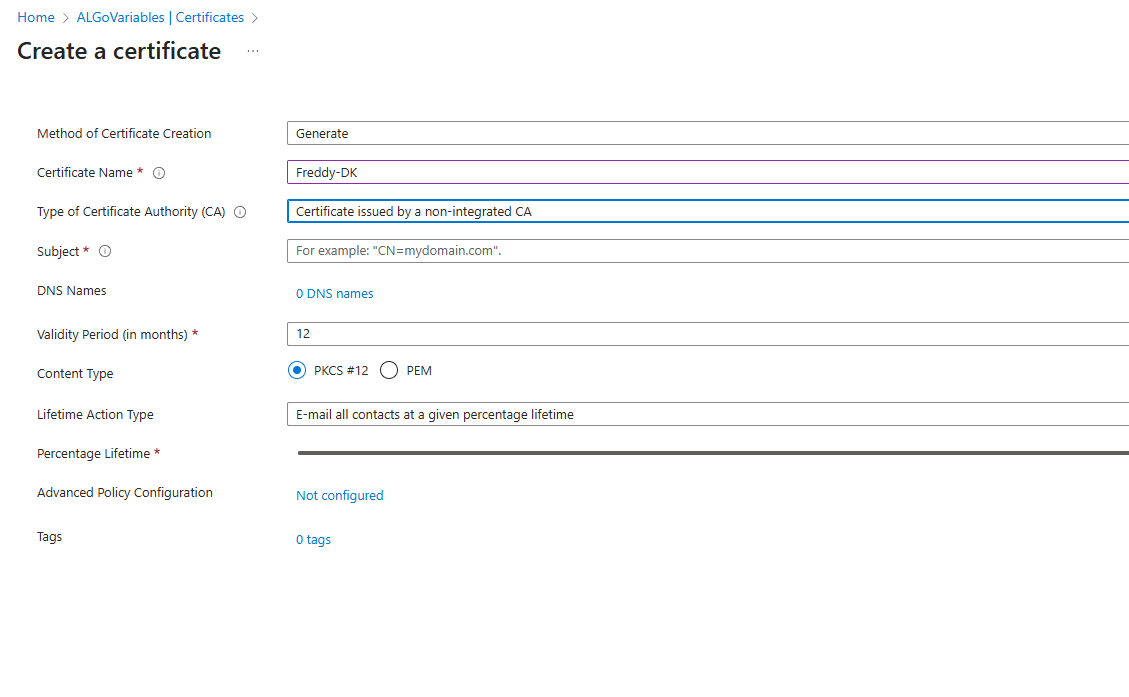
<p>… including a step-by-step guide on how to create a CSR in Azure etc etc. and whenever I had a problem, I would take a snip of part of the screen and ask ChatGPT:</p>

<p><img src="/assets/images/ai-helps-creating-a-code-signing-certificate/image.png" alt="" /></p>

<div class="language-plaintext highlighter-rouge"><div class="highlight"><pre class="highlight"><code>What should these fields be?
</code></pre></div></div>

<p>ChatGPT says:</p>

<p><em>Perfect — you’re on the <strong>Azure Key Vault → Create a certificate</strong> screen. This is exactly where you’ll create the pending certificate request (CSR) to later submit to DigiCert. Let me walk you through each field and what to put when ordering a <strong>standard DigiCert code signing certificate</strong></em></p>

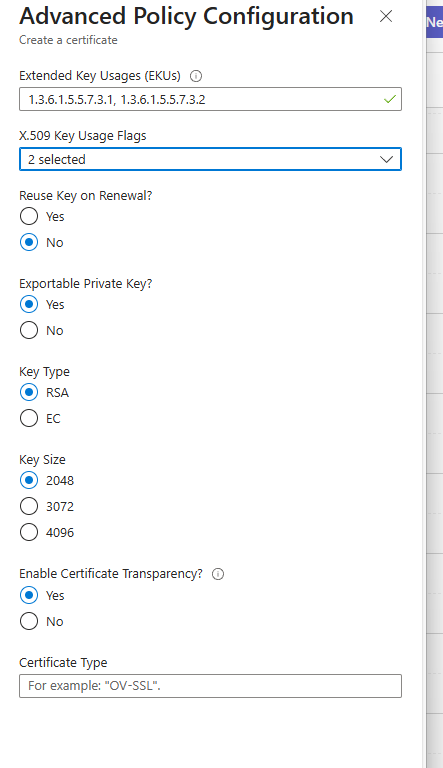
<p>Instead of being frustrated and not able to figure out what to do – it encourages me and holds my hand – NICE. But now this:</p>

<p><img src="/assets/images/ai-helps-creating-a-code-signing-certificate/image-1.png" alt="" /></p>

<p>Surely I need to call some expert for this? But no – just pasted the image into ChatGPT and it gave me a detailed explanation and a correct configuration summary:</p>

<p><em>EKU: <code class="language-plaintext highlighter-rouge">1.3.6.1.5.5.7.3.3 (Code Signing)</code>
Key Usage: <code class="language-plaintext highlighter-rouge">Digital Signature</code> (+ optionally Non-Repudiation)
Exportable Private Key: <strong>No</strong>
Key Type: RSA
Key Size: <strong>3072</strong>
Certificate Transparency: No</em></p>

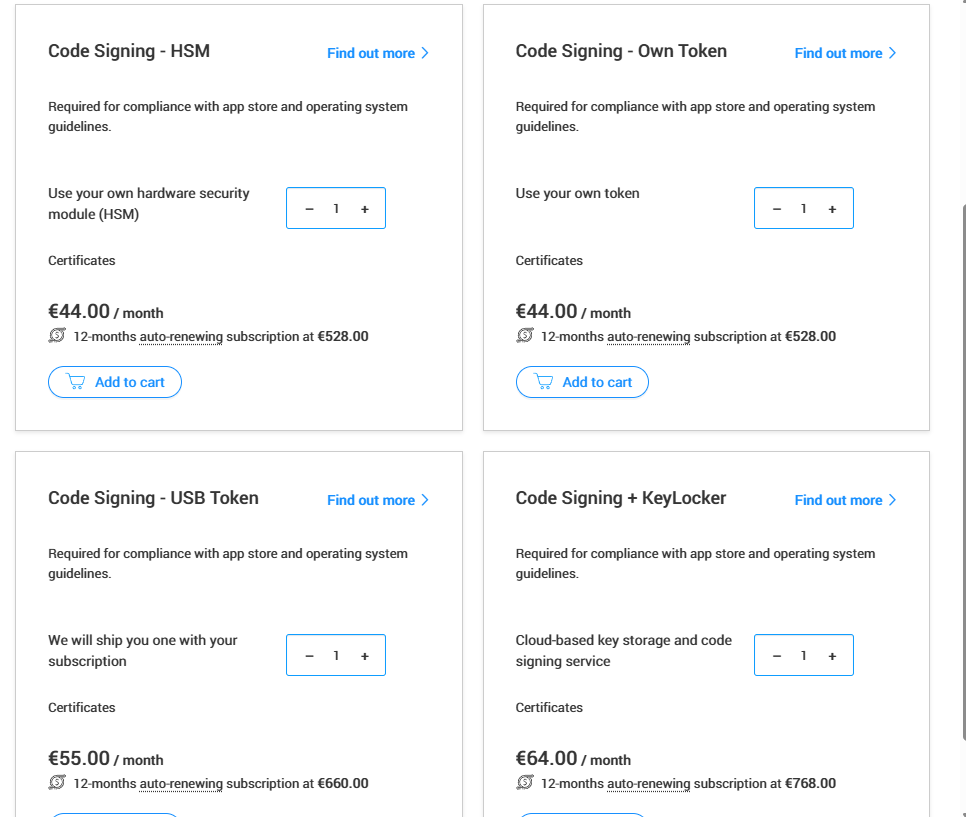
<p>ChatGPT even asks me if I want help ordering my certificate with digicert and now, I decide to go all the way and everytime I am in doubt, I just paste in the image and I get help:</p>

<p><img src="/assets/images/ai-helps-creating-a-code-signing-certificate/image-2.png" alt="" /></p>

<p>and I get:</p>

<p><em>Perfect — you’re at the <strong>product selection screen</strong> for DigiCert code signing certificates. Let me break these four options down in the context of using <strong>Azure Key Vault HSM</strong>:</em></p>

<hr />

<h3 id="-what-each-option-means">🔑 <em>What each option means</em></h3>

<ul>
  <li><strong><em>Code Signing – HSM (€44/mo, €528/yr)</em></strong>
    <ul>
      <li><em>✅ This is the one you want.</em></li>
      <li><em>It assumes you will <strong>generate the key in your own HSM</strong> (in your case, Azure Key Vault HSM).</em></li>
      <li><em>You’ll provide DigiCert with the CSR generated inside Azure.</em></li>
      <li><em>After validation, DigiCert issues a cert you merge back into Key Vault.</em></li>
    </ul>
  </li>
  <li><strong><em>Code Signing – Own Token (€44/mo)</em></strong>
    <ul>
      <li><em>For when you already have a USB token (like SafeNet) and want the certificate loaded there.</em></li>
      <li><em>❌ Not for Azure Key Vault.</em></li>
    </ul>
  </li>
  <li><strong><em>Code Signing – USB Token (€55/mo)</em></strong>
    <ul>
      <li><em>DigiCert will <strong>ship you a hardware token</strong> with the cert pre-installed.</em></li>
      <li><em>❌ Not needed if you’re using Azure HSM.</em></li>
    </ul>
  </li>
  <li><strong><em>Code Signing + KeyLocker (€64/mo)</em></strong>
    <ul>
      <li><em>DigiCert’s own <strong>cloud-based HSM service</strong>.</em></li>
      <li><em>You’d sign through their API instead of Azure.</em></li>
      <li><em>❌ Skip this since you want Azure Key Vault.</em></li>
    </ul>
  </li>
</ul>

<p>Amazed and within 1 hour I have ordered a code signing certificate, which I will receive once my company and I have been validated.</p>

<h2 id="verdict">Verdict</h2>

<p>This process could easily have taken me many hours and much frustration and with some very very simple prompts, ChatGPT could guide me through the entire process.</p>

<p>What’s not to like!!!</p>

<p>I did not try the other AIs, but I kind of assume that if they can understand and read images, they should be able to do the same. I obviously don’t need more than one code signing certificate, but I will try a few other things with images and AIs another day – stay tuned…</p>

<p>This post was written on October 1st, 2025 – AI’s might/will change…</p>

<p>Until next time</p>

<p><strong><em>A Daily Prompt | Freddy Kristiansen</em></strong></p>]]></content><author><name>Freddy Kristiansen</name></author><category term="A Daily Prompt" /><category term="Developer" /><category term="Certificate" /><category term="ChatGPT" /><category term="Developer" /><summary type="html"><![CDATA[On June 1st, 2023, the CA/Browser Forum’s Baseline Requirements for Code Signing changed. Certificate Authorities could no longer issue software-based OV code signing certificates in exportable formats such as .pfx. Instead, all new certificates must have their private keys stored in secure hardware (e.g., USB token, HSM, or cloud HSM), meaning you can no longer just protect a .pfx with a password and use it for signing.]]></summary></entry><entry><title type="html">AI helps with gift search</title><link href="https://adailyprompt.ai/2025/09/30/ai-helps-with-gift-search/" rel="alternate" type="text/html" title="AI helps with gift search" /><published>2025-09-30T12:28:29+02:00</published><updated>2025-09-30T12:28:29+02:00</updated><id>https://adailyprompt.ai/2025/09/30/ai-helps-with-gift-search</id><content type="html" xml:base="https://adailyprompt.ai/2025/09/30/ai-helps-with-gift-search/"><![CDATA[<h2 id="introduction">Introduction</h2>

<p>Finding the right gift can be mind-boggling, and honestly, rather stressful. Whether it’s for a birthday, Christmas or other. And more often than not, a generic chocolate or note doesn’t quite swing it.</p>

<p>Even worse, if you forget it, and find yourself looking for a gift 2 days before the party. It’s obviously too late to call and ask for a list, so what can you do?</p>

<p>This is where AI can help you. Often it’s hard for us to compose all the different ideas, and what answers you should be asking yourself, while keeping track of how much you wanted to spend.</p>

<p>Lets take a deep dive into the world of gift searching with AI.</p>

<h2 id="prompt-example">Prompt Example</h2>

<p>Lets first get an idea of the considerations we have to take into account, when searching for a gift.
We start with the following prompt search:</p>

<div class="language-plaintext highlighter-rouge"><div class="highlight"><pre class="highlight"><code>Write me a detailed prompt that helps me find a birthday present
</code></pre></div></div>

<p><em>You are my expert gift concierge. Your goal is to help me choose a highly suitable birthday present.</em></p>

<p><em>FIRST: If any required info is missing, ask up to 5 concise clarifying questions covering: recipient, budget, timeline/shipping, interests, and constraints. Do not list gift ideas until I answer or say “use your best judgment.”</em></p>

<p><em>CONTEXT</em></p>

<ul>
  <li><em>Recipient: [who are they to me? e.g., partner, friend, parent, colleague]</em></li>
  <li><em>Age range: [e.g., 6–8, 18–25, 30s, 60+]</em></li>
  <li><em>Personality &amp; interests: [hobbies, fandoms, daily routines, values]</em></li>
  <li><em>Lifestyle signals: [travels often, remote worker, student, new parent, pet owner, minimalist, eco-conscious]</em></li>
  <li><em>Hard constraints: [budget range, currency, latest delivery date, region for buying/shipping, allergies, no alcohol/fragrance, ethical/sustainable, compact/packable, small apartment, avoids clutter]</em></li>
  <li><em>Soft preferences: [physical vs. experience, sentimental vs. practical, handmade vs. premium brand, tech vs. analog]</em></li>
  <li><em>What they already own or dislike: [optional]</em></li>
  <li><em>My relationship context: [inside jokes, shared memories, milestones, how personal can the gift be?]</em></li>
</ul>

<p><em>TASK</em>
<em>1) Generate 12–18 diverse gift ideas across categories (practical, sentimental, experiential, hobby-specific, premium “wow”, budget-friendly, and DIY/personalized).
2) Tailor each idea specifically to THIS recipient and context (not generic).
3) Prefer items that can be ordered or delivered to: [country/region]. Flag any that may not ship or arrive before: [date].
4) Avoid anything that violates constraints.</em></p>

<p><em>OUTPUT FORMAT (table)</em></p>

<ul>
  <li><em>Idea (short name)</em></li>
  <li><em>Why it’s a great fit (tie directly to interests &amp; context)</em></li>
  <li><em>Personalization options (engraving, colorways, add-on ideas, message)</em></li>
  <li><em>Estimated price (local currency), lead time</em></li>
  <li><em>Where to buy (reputable retailer + 1–2 alternates, include URLs if possible)</em></li>
  <li><em>Risks/notes (sizing, compatibility, returns, allergens)</em></li>
</ul>

<p><em>QUALITY RULES</em></p>

<ul>
  <li><em>Be concrete (models, materials, specific experiences, local vendors if region known).</em></li>
  <li><em>Include at least 3 experience-based ideas and 3 sentimental/personalized ideas.</em></li>
  <li><em>Include at least 2 fast-delivery “backup” options under [budget ceiling].</em></li>
  <li><em>Call out any items that typically require advance booking or customization time.</em></li>
  <li><em>If my budget is tight, show creative/DIY or bundle ideas; if generous, include a standout “centerpiece” gift plus complementary add-ons.</em></li>
  <li><em>End with a 2–3 line sample gift message tailored to the recipient’s vibe.</em></li>
</ul>

<p><em>Now, start by confirming what’s missing, then produce the table.</em></p>

<p>The idea with these AI generated prompts, is to give the AI enough information that it is able to generate an idea from your thoughts. Remember, it only knows what you’ve just told it. (And everything on the internet other than social media)
It’s clear to see the difference on prompts that we write ourselves, and prompts that are written by AI. Both on the prompt itself, but also the answer we receive.</p>

<p><em>An obvious follow-up prompt could be</em></p>

<div class="language-plaintext highlighter-rouge"><div class="highlight"><pre class="highlight"><code>I loved your 6. Idea with the "..." Please elaborate on the following :
- Different website that sells it
- Customer Reviews
</code></pre></div></div>

<h2 id="verdict">Verdict</h2>

<p>This example is of course missing a lot of context, but I believe the main idea gets through. Using AI to pick your ideas, collect them all in a sheet for you to decide. Personally I was amazed over the gift’s it gave me, and I’ve already decided on one of them for Freddy’s 60th birthday.</p>

<p>While writing this blog i also came to the realization, that AI is quite screened off from all Social Media.
Copilot, Meta AI &amp; Gemini was all able to find information on Freddy, but only from websites, blogs etc. that have written about him. Facebook, X &amp; other social platforms are all completely prohibited to the search of AI Tools. This definitely has it’s upsides, but for gift search – it for sure was a downside.
While it technically is possible with using an MCP server to connect through Facebook’s API, this is not at all worth the hassle considering its only a present we are looking for. For not to speak about the security warnings, non automation &amp; other road blocks that we might find.</p>

<p>We’ll have to see how the gift holds op in December, when Freddy gets to receive it.</p>

<p>This post was written on September 30th, 2025 – AI’s might/will change…</p>

<p>Until next time</p>

<p><strong><em>A Daily Prompt | Jonas Dalgas Kristiansen</em></strong></p>]]></content><author><name>Freddy Kristiansen</name></author><category term="A Daily Prompt" /><category term="Beginner" /><category term="Christmas" /><category term="Copilot" /><category term="Meta AI" /><summary type="html"><![CDATA[Introduction]]></summary></entry><entry><title type="html">Playlists with AI</title><link href="https://adailyprompt.ai/2025/09/29/playlists-with-ai/" rel="alternate" type="text/html" title="Playlists with AI" /><published>2025-09-29T12:08:04+02:00</published><updated>2025-09-29T12:08:04+02:00</updated><id>https://adailyprompt.ai/2025/09/29/playlists-with-ai</id><content type="html" xml:base="https://adailyprompt.ai/2025/09/29/playlists-with-ai/"><![CDATA[<h2 id="introduction">Introduction</h2>

<p>Music is something we all enjoy. Whether it is at home, on the workplace or on the go, we all listen to music. I often times find myself in the struggle, what should I listen to next? I’ve heard the same playlist on repeat around 50 times, and I’m ready for a new artist to try – Spotify has this option. They call them “Daily Mix” or “Chill Mix” or something 3rd that explains the songs. While this is great, you are not able to modify these drastically, or speak with an AI that are able to change the mood a bit.</p>

<h2 id="ai-gets-to-work">AI gets to work</h2>

<p>Not having done the necessary research on how to create an AI playlist, i started out with the following prompt to Copilot : (Well knowing that it cant perform actions on website etc.)</p>

<div class="language-plaintext highlighter-rouge"><div class="highlight"><pre class="highlight"><code>What AI is able to create playlists on Spotify, with a prompt chat?
</code></pre></div></div>

<p>It gave me links to 4 different websites, where i went with <a href="https://www.playlistai.app/">https://www.playlistai.app/</a> Because they have a GPT (agent) that can connect directly with your Spotify, and create everything for you. This is the magic of <em>connectors</em> more on this term is yet to come here on adailyprompt.ai.</p>

<h3 id="how-to-use-a-connector">How to use a connector</h3>

<p><em>When opening the link : <a href="https://www.playlistai.app/">https://www.playlistai.app/</a>
You will find a button saying “Use in ChatGPT”, proceed to click this button, to open their personal GPT.
From here you can now chat with their AI, that is built upon ChatGPT-5 LLM.
If we wanted to create a playlist, start with the prompt as before:
create a playlist for me on spotify with “..” songs
When it has made sure it understands your prompt, it will join the connector to the chat. Here you will find the button “Sign in with spotify.playlistai.app”
After clicking this, you will be redirected to spotify to log in. Make sure to press allow to them wanting to talk with spotify.
You have now tried using your first connector on the GPT network, Good job!</em></p>

<p>After opening a chat with their GPT on ChatGPT’s website i accepted the connection between them and spotify, and i was ready to go. From there, I typed the following prompt :</p>

<div class="language-plaintext highlighter-rouge"><div class="highlight"><pre class="highlight"><code>create a playlist for me on spotify with all Wiz Khalifas best songs
</code></pre></div></div>

<p>As a huge fan of this specific artist, it was of course spot on.</p>

<p>But… The magic doesn’t stop there. – As previous mentioned, Spotify is able to do the exact same thing, so what makes this any different, you may ask? The LLM behind it all is the obvious answer. With the GPT you are basically chatting with your playlist and can request changes, additions, tweaks, removals etc. All within a heartbeat! (And a little prompt)</p>

<h2 id="verdict">Verdict</h2>

<p>It’s safe to say, that i got surprised. The simplicity for the GPT to connect to Spotify, and from there being able to create everything within Spotify was just amazing. A worthy note is the difference between asking google and asking Copilot when searching for an AI tool.
Google directly gives me link to a Spotify AI playlist generator (that doesn’t work in Denmark) and links to Reddit posts, for myself to read and find what websites to use. All this while the link is just a simple prompt away in Copilot. The simplicity is absolutely amazing.</p>

<p>And for anyone curious, this is the following playlist it created.</p>

<p>Maybe we will hear more to this AI on Freddy’s birthday…</p>

<p>This post was written on September 29th, 2025 – AI’s might/will change…</p>

<p>Until next time</p>

<p><strong><em>A Daily Prompt | Jonas Dalgas Kristiansen</em></strong></p>]]></content><author><name>Freddy Kristiansen</name></author><category term="A Daily Prompt" /><category term="Beginner" /><category term="ChatGPT" /><category term="Music" /><summary type="html"><![CDATA[Introduction]]></summary></entry><entry><title type="html">Using AI to generate images for this blog</title><link href="https://adailyprompt.ai/2025/09/27/using-ai-to-generate-images-for-this-blog/" rel="alternate" type="text/html" title="Using AI to generate images for this blog" /><published>2025-09-28T00:15:09+02:00</published><updated>2025-09-28T00:15:09+02:00</updated><id>https://adailyprompt.ai/2025/09/27/using-ai-to-generate-images-for-this-blog</id><content type="html" xml:base="https://adailyprompt.ai/2025/09/27/using-ai-to-generate-images-for-this-blog/"><![CDATA[<p>From day 1, Jonas and I decided that the content of this blog should be authentic. The text should be written by us, not by AI. But… – we also decided that the images for each blog post should be generated by AI and our dog (Akela, a 7 year old Shiba) should be the “model” for these images.</p>

<p>I am always using ChatGPT and the prompt used to generate the image for this blog post is:</p>

<div class="language-plaintext highlighter-rouge"><div class="highlight"><pre class="highlight"><code>Create an image of a computer nerd Shiba, generating pictures of shibas using ChatGPT, cartoon style, size 1024x1024
</code></pre></div></div>

<p>Pretty funny that it writes GPT-4 on the screen, even though it itself is GPT-5 🙂</p>

<p>The prompt used to create yesterdays image was:</p>

<div class="language-plaintext highlighter-rouge"><div class="highlight"><pre class="highlight"><code>Create an image of a Shiba Inu as a tourist in Japan watching a japanese temple, cartoon style, size 1024x1024
</code></pre></div></div>

<p>and running this four times, yields 4 different images:</p>

<p><img src="/assets/images/using-ai-to-generate-images-for-this-blog/shiba_2x2_grid_with_borders.png" alt="" /></p>

<p>And then I selected the 1st one.</p>

<p>If I had asked 4 skilled cartoonists, using the same drawing style, to draw an image following the same very weak guideline – they would also have given me 4 different images, which all fully matches the description.</p>

<p>BTW, Creating this image (including 4 images) could obviously be done in Paint.NET or like, but I uploaded all 4 generated images to ChatGPT and asked:</p>

<div class="language-plaintext highlighter-rouge"><div class="highlight"><pre class="highlight"><code>Can you combine these 4 images into one big image by putting 2 images side by side above 2 images side by side and a black line around and between the images.
</code></pre></div></div>

<p>Which is exactly what it did, this prompt is leaving little space for interpretation.</p>

<p>Let’s see how the other AIs does with the Japanese tourist prompt:</p>

<h2 id="google-gemini--nano-banana">Google Gemini / Nano Banana</h2>

<p><img src="/assets/images/using-ai-to-generate-images-for-this-blog/shiba-japan-gemini.png" alt="" /></p>

<p>Nice job, but the tail looks more like a fox – you never see a Shiba tail like that.</p>

<h2 id="microsoft-copilot">Microsoft Copilot</h2>

<p><img src="/assets/images/using-ai-to-generate-images-for-this-blog/shiba-japan-copilot.png" alt="" /></p>

<p>Very clear that Microsoft uses GPT5 like ChatGPT.</p>

<h2 id="mistral">Mistral</h2>

<p><img src="/assets/images/using-ai-to-generate-images-for-this-blog/shiba-japan-mistral.jpg" alt="" /></p>

<p>I kind of think I can see that this is a French tourist in Japan:-)</p>

<h2 id="x--grok">X | Grok</h2>

<p><img src="/assets/images/using-ai-to-generate-images-for-this-blog/shiba-japan-grok.jpg" alt="" /></p>

<p>Nice photo, but it doesn’t really look like a tourist, it looks more like a Japanese Shiba Inu, which wasn’t what I was looking for.</p>

<h2 id="meta-ai">Meta AI</h2>

<p><img src="/assets/images/using-ai-to-generate-images-for-this-blog/shiba-japan-meta.png" alt="" /></p>

<p>and this looks more like a homeless Shiba in Japan and not really a tourist.</p>

<h2 id="verdict">Verdict</h2>

<p>You can compare the various AIs as different cartoonists who has attended different schools, yielding different drawing styles. Kind of like there is a huge difference between the way Hergé was drawing the adventures of Tintin and how Jack Kirby and Steve Ditko drew various Marvel heros.</p>

<p>This post was written on September 27th, 2025 – AI’s might/will change…</p>

<p>Until next time</p>

<p><strong><em>A Daily Prompt | Freddy Kristiansen</em></strong></p>]]></content><author><name>Freddy Kristiansen</name></author><category term="A Daily Prompt" /><category term="ChatGPT" /><category term="Copilot" /><category term="Gemini" /><category term="Grok" /><category term="Image" /><category term="Meta AI" /><category term="Mistral" /><category term="Nano-Banana" /><summary type="html"><![CDATA[From day 1, Jonas and I decided that the content of this blog should be authentic. The text should be written by us, not by AI. But… – we also decided that the images for each blog post should be generated by AI and our dog (Akela, a 7 year old Shiba) should be the “model” for these images.]]></summary></entry><entry><title type="html">Using AI as your travel guide</title><link href="https://adailyprompt.ai/2025/09/26/using-ai-as-your-travel-guide/" rel="alternate" type="text/html" title="Using AI as your travel guide" /><published>2025-09-26T20:52:41+02:00</published><updated>2025-09-26T20:52:41+02:00</updated><id>https://adailyprompt.ai/2025/09/26/using-ai-as-your-travel-guide</id><content type="html" xml:base="https://adailyprompt.ai/2025/09/26/using-ai-as-your-travel-guide/"><![CDATA[<p>In 2024 our summer vacation destination was Japan. As many times before, my vacation plans start by booking the flight tickets back and forth and then fill in the details later. Getting closer to travel – I asked ChatGPT the very simpel question:</p>

<div class="language-plaintext highlighter-rouge"><div class="highlight"><pre class="highlight"><code>Please create a high level itinerary for a 2 week vacation in Japan. We fly into Tokyo and back from Tokyo.
</code></pre></div></div>

<p>The response was the following:</p>

<h3 id="day-13-tokyo"><strong>Day 1–3: Tokyo</strong></h3>

<ul>
  <li>Arrive Tokyo, settle in.</li>
  <li>Explore neighborhoods: Shinjuku, Shibuya, Harajuku, Asakusa (Senso-ji).</li>
  <li>Modern highlights: teamLab Planets, Tokyo Skytree, Odaiba.</li>
  <li>Optional day trip: Nikko or Yokohama.</li>
</ul>

<h3 id="day-45-hakone--mt-fuji-area"><strong>Day 4–5: Hakone / Mt. Fuji Area</strong></h3>

<ul>
  <li>Relax in onsen ryokan (traditional inn with hot springs).</li>
  <li>Enjoy Fuji views, Lake Ashi, Hakone Open-Air Museum.</li>
  <li>Travel via Romancecar or shinkansen + local transport.</li>
</ul>

<p><img src="/assets/images/using-ai-as-your-travel-guide/2024-07-13-04.53.21.jpg" alt="" /></p>

<h3 id="day-68-kyoto"><strong>Day 6–8: Kyoto</strong></h3>

<ul>
  <li>Visit iconic temples &amp; shrines: Fushimi Inari, Kinkaku-ji, Kiyomizu-dera.</li>
  <li>Stroll Gion district, Arashiyama bamboo grove, Nishiki Market.</li>
  <li>Tea ceremony or kimono experience.</li>
  <li>Evening along the Kamogawa river.</li>
</ul>

<h3 id="day-9-nara-day-trip-from-kyoto"><strong>Day 9: Nara (Day Trip from Kyoto)</strong></h3>

<ul>
  <li>Giant Buddha at Todai-ji.</li>
  <li>Friendly deer at Nara Park.</li>
  <li>Return to Kyoto in evening.</li>
</ul>

<p><img src="/assets/images/using-ai-as-your-travel-guide/2024-07-08-07.16.33.jpg" alt="" /></p>

<h3 id="day-1011-osaka"><strong>Day 10–11: Osaka</strong></h3>

<ul>
  <li>Osaka Castle &amp; Dotonbori street food.</li>
  <li>Universal Studios Japan (if you like theme parks).</li>
  <li>Nightlife in Namba.</li>
</ul>

<h3 id="day-12-hiroshima--miyajima"><strong>Day 12: Hiroshima &amp; Miyajima</strong></h3>

<ul>
  <li>Morning train to Hiroshima.</li>
  <li>Visit Peace Memorial Park &amp; Museum.</li>
  <li>Ferry to Miyajima Island (Itsukushima Shrine, Mount Misen hike).</li>
  <li>Overnight in Hiroshima or Miyajima.</li>
</ul>

<h3 id="day-13-return-to-tokyo-via-himeji-stop-if-time"><strong>Day 13: Return to Tokyo (via Himeji stop if time)</strong></h3>

<ul>
  <li>Optional Himeji Castle stop.</li>
  <li>Evening arrival in Tokyo.</li>
  <li>Last-minute shopping in Ginza or Akihabara.</li>
</ul>

<h3 id="day-14-tokyo--departure"><strong>Day 14: Tokyo &amp; Departure</strong></h3>

<ul>
  <li>Easy morning: Meiji Shrine or Imperial Palace gardens.</li>
  <li>Pack up, final souvenirs, head to airport.</li>
</ul>

<p>We could have added more detail about what we wanted ChatGPT to focus on, but this actually ended up being pretty much our itinerary for the trip. We didn’t do Hiroshima and Himeji and instead of that we added an extra day in Tokyo. I also heard about this holy city somewhere in the mountains and ChatGPT immediately told me that I probably thought about Koyasan – so we added a night in a shukubō (temple lodging).</p>

<p>The nice thing about AI is that it doesn’t get offended if you don’t follow its advise:-)</p>

<h2 id="a-day-trip">A day trip</h2>

<p>It is also possible to “zoom in” and ask AI to help with a more detailed day-trip:</p>

<div class="language-plaintext highlighter-rouge"><div class="highlight"><pre class="highlight"><code>Please plan a day trip to Shibuya, We are staying at a hotel near Shinagawa station.
</code></pre></div></div>

<p>And again, AI comes with a packed agenda, from which we picked a good number of spots to visit (not all) and AI didn’t get offended by our picks.</p>

<h2 id="day-trip-to-shibuya-from-shinagawa"><strong>Day Trip to Shibuya (from Shinagawa)</strong></h2>

<h3 id="morning"><strong>Morning</strong></h3>

<ul>
  <li>🚆 Take JR Yamanote Line to <strong>Shibuya Station</strong> (Hachiko Exit).</li>
  <li>📸 <strong>Hachiko Statue</strong> – quick photo stop.</li>
  <li>🌆 <strong>Shibuya Scramble Crossing</strong> – best seen from above (Shibuya Sky or from Starbucks Tsutaya).</li>
  <li>🛍️ <strong>Shibuya Center Gai</strong> – lively shopping street with youth culture, fashion, arcades.</li>
</ul>

<p><img src="/assets/images/using-ai-as-your-travel-guide/2024-07-04-16.27.13.jpg" alt="" /></p>

<h3 id="late-morning"><strong>Late Morning</strong></h3>

<ul>
  <li>🛍️ Explore <strong>Shibuya Parco</strong> (artsy shops, Nintendo &amp; Pokémon centers inside).</li>
  <li>🎶 Optional: <strong>Tower Records Shibuya</strong> – legendary music store.</li>
</ul>

<h3 id="lunch"><strong>Lunch</strong></h3>

<ul>
  <li>🍜 Try ramen at <strong>Ichiran Shibuya</strong> (famous solo-booth ramen) or a sushi spot like <strong>Uobei</strong> (conveyor belt sushi).</li>
</ul>

<h3 id="afternoon"><strong>Afternoon</strong></h3>

<ul>
  <li>🌳 Walk to <strong>Yoyogi Park</strong> and <strong>Meiji Jingu Shrine</strong> (15–20 min walk from Shibuya). Peaceful contrast to Shibuya’s buzz.</li>
  <li>OR stay in Shibuya for <strong>Shibuya 109</strong> (trendy fashion mall) + <strong>Shibuya Hikarie</strong> (modern shopping, food hall, great city views).</li>
</ul>

<h3 id="late-afternoon--early-evening"><strong>Late Afternoon / Early Evening</strong></h3>

<ul>
  <li>🌇 Go up to <strong>Shibuya Sky (Scramble Square)</strong> around sunset – panoramic Tokyo views are stunning.</li>
  <li>🏮 Explore <strong>Nonbei Yokocho</strong> (tiny old-style bars) or <strong>Shibuya Yokocho</strong> (food alley with izakayas).</li>
</ul>

<h3 id="dinner"><strong>Dinner</strong></h3>

<ul>
  <li>🍣 Sushi at <strong>Uobei</strong>, casual izakaya dinner, or yakitori at <strong>Torikizoku</strong>.</li>
  <li>If you want something atmospheric: <strong>Niku Yokocho</strong> (meat alley) for Japanese BBQ-style dining.</li>
</ul>

<h3 id="night"><strong>Night</strong></h3>

<ul>
  <li>🎶 Check out live music at a small venue, or grab a drink in a quirky Shibuya bar.</li>
  <li>🚆 Return to Shinagawa (last Yamanote Line trains run after midnight).</li>
</ul>

<p>The Ramen was amazing BTW.</p>

<p>Obviously, if you want more focus on shopping, just mention it in the prompt and your wish will be heard.</p>

<h2 id="upload-a-photo-and-ask">Upload a photo and ask</h2>

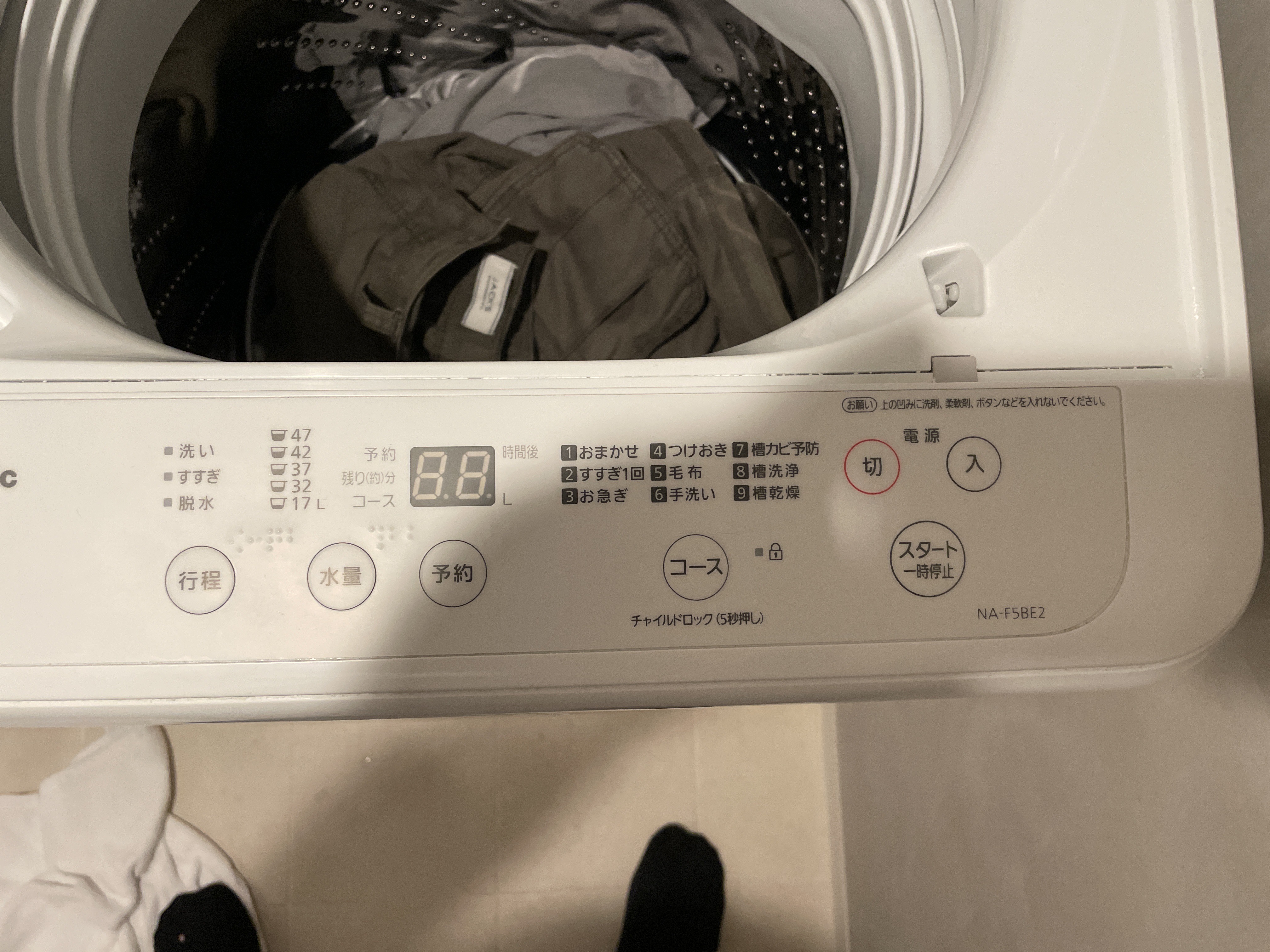
<p>Another place where I constantly had to use ChatGPT was when reading instructions. When you are travelling for 2 weeks, you need clean clothes – just take a photo of the washing machine and ask ChatGPT how to start the machine:</p>

<p><img src="/assets/images/using-ai-as-your-travel-guide/2024-07-07-18.41.12.jpg" alt="" /></p>

<div class="language-plaintext highlighter-rouge"><div class="highlight"><pre class="highlight"><code>How do I start a normal warm (around 40 degrees) was with this machine?
</code></pre></div></div>

<p>Great photo — thanks! I can help you with this Japanese washing machine (Panasonic NA-F5BE2, top-loading).</p>

<p>Here’s how to do a <strong>normal warm wash (~40°C)</strong>:</p>

<hr />

<h3 id="1-power-on">1. Power On</h3>

<ul>
  <li>Press <strong>電源 (でんげん / Power)</strong> → the <strong>red circle button on the right (“切 入”)</strong>.
    <ul>
      <li>切 = Off</li>
      <li>入 = On</li>
    </ul>
  </li>
</ul>

<h3 id="2-select-course-wash-program">2. Select Course (Wash Program)</h3>

<ul>
  <li>Press <strong>コース (Course)</strong> until you see <strong>おまかせ (Standard / Automatic)</strong>.
    <ul>
      <li>This is the default “normal wash” program.</li>
    </ul>
  </li>
</ul>

<h3 id="3-adjust-water-temperature">3. Adjust Water Temperature</h3>

<p>⚠️ This machine <strong>does not have a built-in water heater</strong> (very common in Japanese washers).</p>

<ul>
  <li>It washes with <strong>tap water only</strong> (cold or lukewarm depending on your plumbing).</li>
  <li>If your tap is connected to a warm-water line (~40°C), then set it there manually.</li>
  <li>Otherwise, it will wash cold.</li>
</ul>

<h3 id="4-start-the-wash">4. Start the Wash</h3>

<ul>
  <li>Press <strong>スタート / 一時停止 (Start / Pause)</strong> → the big button bottom-right.</li>
</ul>

<h2 id="and-more">And more…</h2>

<p>We actually ended up using ChatGPT so frequently that I had to buy a subscription to the product and since then… – I have been a subscriber.</p>

<p>This post was written on September 26th, 2025 – AI’s might/will change…</p>

<p>Until next time</p>

<p><strong><em>A Daily Prompt | Freddy Kristiansen</em></strong></p>]]></content><author><name>Freddy Kristiansen</name></author><category term="A Daily Prompt" /><category term="ChatGPT" /><category term="Food" /><category term="Travel" /><summary type="html"><![CDATA[In 2024 our summer vacation destination was Japan. As many times before, my vacation plans start by booking the flight tickets back and forth and then fill in the details later. Getting closer to travel – I asked ChatGPT the very simpel question:]]></summary></entry><entry><title type="html">Weekend Planning with an AI</title><link href="https://adailyprompt.ai/2025/09/25/weekend-planning-with-an-ai/" rel="alternate" type="text/html" title="Weekend Planning with an AI" /><published>2025-09-26T00:41:10+02:00</published><updated>2025-09-26T00:41:10+02:00</updated><id>https://adailyprompt.ai/2025/09/25/weekend-planning-with-an-ai</id><content type="html" xml:base="https://adailyprompt.ai/2025/09/25/weekend-planning-with-an-ai/"><![CDATA[<h2 id="introduction">Introduction</h2>

<p>Weekends are supposed to rechange us, and get us ready for the next Monday – but in the busy day-to-day life we often fall short on planning the big trips for the weekend. Errands, social plans and other things become priorities, and the trip that we truly wish for, doesn’t become a reality.</p>

<p>Whether you’re planning something solo, or for the whole family calendar, AI can turn the “We should do something this weekend” into a cut in stone, realistic &amp; budget-aware plan, ready to follow and enjoy.</p>

<h2 id="example-prompt">Example prompt</h2>

<p>First we had to set up the prompt. And I asked myself, who is a better prompt engineer than ChatGPT Itself? With that logic i asked it to create a prompt to plan my weekend and ended up with the following</p>

<div class="language-plaintext highlighter-rouge"><div class="highlight"><pre class="highlight"><code>You are my weekend planning co-pilot. Help me design a balanced, budget-aware plan for Saturday and Sunday.

My constraints and preferences:
- Location: [your city/area]
- People: [solo / couple / family with ages / friends]
- Energy levels: [low / medium / high]
- Budget: [amount + currency] total for the weekend
- Weather sensitivity: [e.g., avoid heavy rain / okay with cold]
- Non-negotiables (must happen): [e.g., gym Sat AM, family lunch Sun, grocery run]
- Goals: [rest, nature, declutter, exercise, social time, a long read]
- Food preferences: [e.g., simple home-cooking, one café, no alcohol]
- Mobility: [walking / bike / public transport / car]
- Time windows unavailable: [times you cannot do activities]
- Kids or pets: [details if any]

Plan requirements:
1) Ask me up to 3 clarifying questions first if anything is ambiguous.
2) Propose a timeboxed schedule for Sat/Sun with start–end times (include buffers).
3) Keep the plan realistic (no more than 3 key activities per day).
4) Stay within the stated budget; include a line-item estimate.
5) Provide 2–3 alternative options for bad weather or low energy.
6) Add a short prep checklist (shopping, bookings, packing).
7) Format the output with:
   - A concise overview (3–5 bullet points)
   - A table with times, activity, location, cost estimate, and energy level
   - Budget summary (planned vs. remaining)
   - Prep checklist
   - Quick booking links or search terms I can paste into Maps
8) End with a 2-sentence reflection prompt for Sunday evening.

Make suggestions that are local, free or low-cost first, and prioritize recovery, daylight, and meaningful time over “busy.”
</code></pre></div></div>

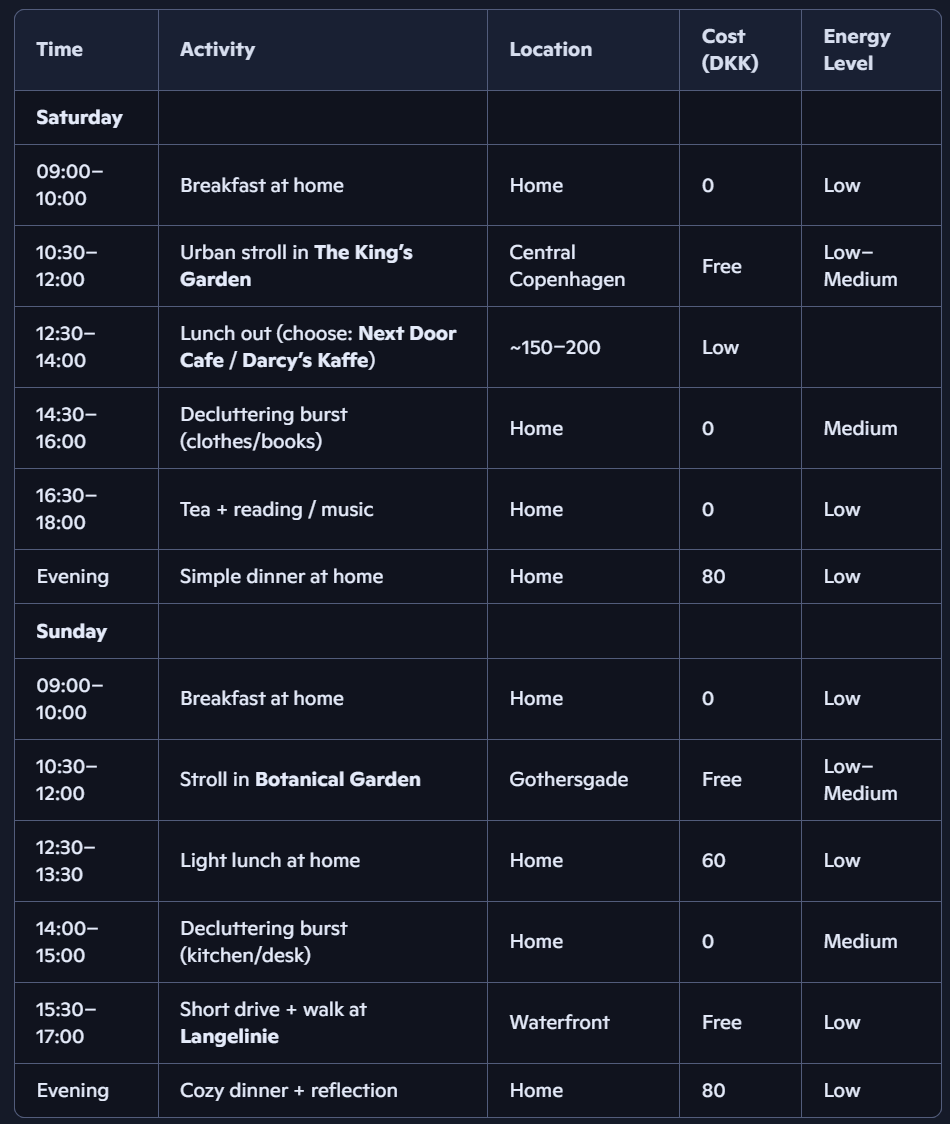
<p>Amazing isnt it? Whats even more amazing is the plan it made for us. Taking into consideration our prompt.</p>

<p><img src="/assets/images/weekend-planning-with-an-ai/screenshot-2025-09-25-220931.png" alt="" /></p>

<p>It also shows Alternative options, if the weather shifts upon us, and even gave a checklist for things to remember before going out. Everything seems about right, except maybe the prices, they seem very cheap.</p>

<h2 id="verdict">Verdict</h2>

<p>AI won’t live your weekend for you, but it can help you live it more intentionally. By locking in a couple of non‑negotiables, adding realistic buffers, and capping your spending, you turn a vague idea into a plan that feels doable. The more context you give, meaning energy levels, weather, budget, even your mood – the more your AI co‑pilot can shape suggestions that feel personal rather than generic. Think of it less as outsourcing your weekend and more as designing it with a thoughtful partner who keeps you on track, so you can focus on actually enjoying the time you’ve carved out.</p>

<p>Bullet proof prompt’s give bullet proof answers.</p>

<p>This post was written on September 25th, 2025 – AI’s might/will change…</p>

<p>Until next time</p>

<p><strong><em>A Daily Prompt | Jonas Dalgas Kristiansen</em></strong></p>]]></content><author><name>Freddy Kristiansen</name></author><category term="A Daily Prompt" /><category term="ChatGPT" /><category term="Copilot" /><category term="Planning" /><summary type="html"><![CDATA[Introduction]]></summary></entry><entry><title type="html">AI as your Interior Designer</title><link href="https://adailyprompt.ai/2025/09/24/ai-as-your-interior-designer/" rel="alternate" type="text/html" title="AI as your Interior Designer" /><published>2025-09-25T00:28:11+02:00</published><updated>2025-09-25T00:28:11+02:00</updated><id>https://adailyprompt.ai/2025/09/24/ai-as-your-interior-designer</id><content type="html" xml:base="https://adailyprompt.ai/2025/09/24/ai-as-your-interior-designer/"><![CDATA[<h2 id="introduction">Introduction</h2>

<p>Many of us love the idea of a perfectly styled home, but making it happen is another story. The measurements, mood boards, and idea’s that never end up being as you intended.</p>

<p>Wouldn’t it make the whole experience easier, if you had a personal assistant, that was able to assist with most?</p>

<p>Think broad. Think price estimates, sketch ideas, search engine &amp; a built in filter.</p>

<h2 id="example-ai-prompt-1-">Example AI prompt 1 –</h2>

<p><img src="/assets/images/ai-as-your-interior-designer/pexels-atbo-66986-245208.jpg" alt="" /></p>

<p>Lets take a very possible example, we need more storage in our living room. As always we take a couple of measurements, and are able to conclude that we can fit a maximum width of 70cm.</p>

<p>Taking this information, we can prompt our Copilot with the following :</p>

<div class="language-plaintext highlighter-rouge"><div class="highlight"><pre class="highlight"><code>I want to buy a "Reol" from Ikea Denmark, that fits on the right, instead of the chair. The maximum width is 70cm.
Go to ikea.com and find all "Reoler" that fits in this space, and create a photo of each, so im able to see how it would look.
</code></pre></div></div>

<p>This of course ends up with the Copilot asking lots of questions, and it ends up being a dialog, for it to meet our exact wishes.</p>

<p>After some back and fourth it gave the following answers :</p>

<p>First mock-up : EKET, with direct link to IKEA.</p>

<p><img src="/assets/images/ai-as-your-interior-designer/designer-2.png" alt="" /></p>

<p>Second mock-up : EKENABBEN, with direct link to IKEA.</p>

<p><img src="/assets/images/ai-as-your-interior-designer/designer-3.png" alt="" /></p>

<p>Third and last mock-up : BRÄNNBOLL, with direct link to IKEA.</p>

<p><img src="/assets/images/ai-as-your-interior-designer/designer-5.png" alt="" /></p>

<h2 id="example-ai-prompt-2-">Example AI prompt 2 –</h2>

<p>For the second example we take a look at the following room</p>

<p><img src="/assets/images/ai-as-your-interior-designer/pexels-medhat-ayad-122846-439227.jpg" alt="" /></p>

<p>I’m considering wooden panels for the back wall. I tried with the following prompt :</p>

<div class="language-plaintext highlighter-rouge"><div class="highlight"><pre class="highlight"><code>Im considering *Wooden panels* for my room. Please find a website that sells DIY wooden panels for indoor use, and create a photo of how it would look in my room on the *Back wall*.
Consider that the wall is 4 meters wide and 3 meters high.
Also give a price estimate on it, taking shipping etc. into consideration i live in Copenhagen Denmark.
</code></pre></div></div>

<p><img src="/assets/images/ai-as-your-interior-designer/unmaned.png" alt="" /></p>

<p>Gemini gave the following respons, that i liked the most, while it didn’t give any price estimates. Copilot on the other hand totally messed up the photo, but gave some very realistic prices, with direct links etc.</p>

<h2 id="benefits-of-using-ai-in-home-design">Benefits of using AI in home design</h2>

<p>Its clear to me, that there are a lot of benefits that we can take home. Being able to search the whole internet for identical solutions. Using AI as a filter on websites, that normally don’t have filters. Being able to iterate between different styles within few minutes, to make sure that you end up with the right decision for your home.</p>

<h2 id="verdict">Verdict</h2>

<p>It’s not the first, and certainly not the last time I’m using AI as a home designer. A worthy note, is to be aware how Gemini generally speaking edits photos better than Copilot. Things can easily become to complicated for Copilot, while the editing feature with Nano Banana is top notch.</p>

<p>Just for context, this is what can happen to a photo, if you dont prompt it accordly while using the wrong LLM (Different bedframe, 1 less folder, non of the books are correct etc.) :</p>

<p><img src="/assets/images/ai-as-your-interior-designer/jpeg.png" alt="" /></p>

<p>It’s also interesting how Copilot ends up changing everything in the photo just a tiny bit, since it doesn’t paste everything from the old photo. instead it creates from scratch. (The tree is different on each mock-up)</p>

<p>Another worthy note is the use of * information *. This is not something we’ve done in the blogs yet, but as prompts become longer and more difficult to understand, the more we need to assist the LLM in order to get the results we want. More information on this will come.</p>

<p>This post was written on September 24th, 2025 – AI’s might/will change…</p>

<p>Until next time</p>

<p><strong><em>A Daily Prompt | Jonas Dalgas Kristiansen</em></strong></p>]]></content><author><name>Freddy Kristiansen</name></author><category term="A Daily Prompt" /><category term="ChatGPT" /><category term="Copilot" /><category term="Design" /><category term="Nano-Banana" /><summary type="html"><![CDATA[Introduction]]></summary></entry></feed>